How to use the cube
How to chargeUPDATED
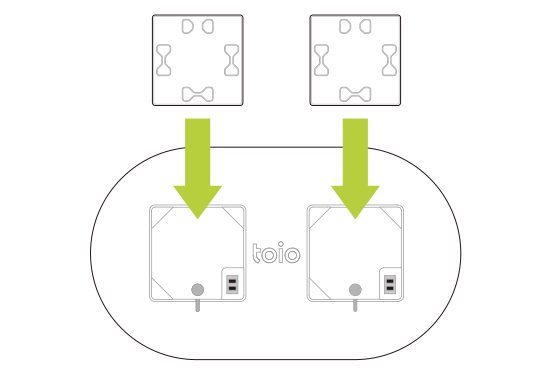
The cube can be charged by placing it on the charger for toio Core Cube or the console charger. For detailed instructions and how to check the remaining battery level of the cube, please refer to the manuals.
How to power on and off
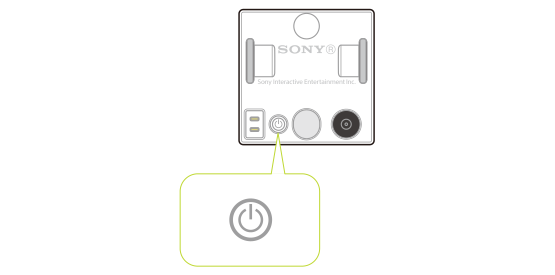
There is a power button on the bottom of the cube. Press the power button to turn on the cube. Pressing and holding the power button turns it off.
Auto power off function
Communication with the cube is done via Bluetooth Low Energy (BLE). If the cube is not connected to any other device via BLE for 15 minutes, it will automatically turn off. An audible alert will also sound every 3 minutes while the cube is not connected to another device via BLE.
For more information on communication with the cube, please see Communication Overview - Communication with the cube.
System stateUPDATED

The state of the cube's system is notified through colors of the indicator and sound alerts. The different states are as follows.
| cube state | Indicator | Audible alert |
|---|---|---|
| Startup | Flashes once in red, blue, green, then white | ○ With audible alert |
| Connecting | Flashes in blue | No audible alert |
| Connected | Indicator turns off | ○ With audible alert |
| Disconnected | Indicator turns off | ○ With audible alert |
| Shutdown | Indicator turns off | ○ With audible alert |
| toio PlayGround | Flashes in yellow and green | ○ With audible alert |
toio PlayGround (flashing yellow and green)NEW
When the cube is in toio PlayGround mode (flashing yellow and green), the cube does not accept external Bluetooth connections.
Transition to toio PlayGround
When the cube is waiting for connection (flashing blue), press and hold the function button or touch a toio PlayGround card to transition to toio PlayGround.
Return from toio PlayGround
To return from toio PlayGround to the normal connectable state, turn the cube off and then on again.
Checking the remaining battery level
When the power button is pressed while the cube is on, the approximate remaining battery level is indicated through the color of the indicator and audible alerts. The remaining battery level and the corresponding condition of the indicator are shown below. Audible alerts are sounded as the indicator flashes.
| Remaining battery level | Indicator | Audible alert |
|---|---|---|
| Battery level is sufficient | Flashes in green three times | Sounds three times as the indicator flashes |
| Battery level is low | Flashes in yellow twice | Sounds twice as the indicator flashes |
| Almost no battery left | Flashes in red once | Sounds once with each flash of the indicator |